For companies that build white-label apps

One link and QR code for every app you build for your clients

Building white-label apps for salons, gyms, shops or restaurants? Give each client one link and QR code that opens their app on the App Store or Google Play, and keeps working when the app changes.

  • One link for iOS and Android
  • A QR code ready to print
  • Change the app, keep the link
  • Create links in the dashboard, with the API or with AI
Create your first link

Free plan, no credit card required
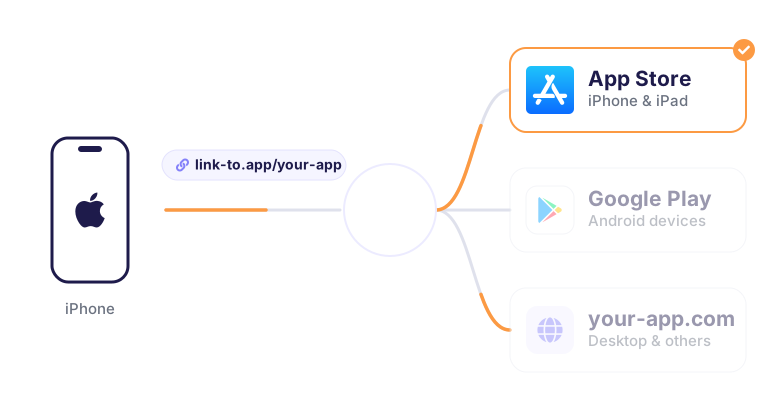
One 1LINK smart link sends iPhone users to the App Store, Android users to Google Play and desktop users to your website

Your client needs one link to share their app

Every app you ship has an App Store listing and a Google Play listing. Your client wants one thing to put on Instagram, on the shop window and next to the till. A 1LINK.IO link opens the right store for each phone, and its QR code does the same on paper.


How to give every client app one link

1. Publish the app

Publish your client's app on the App Store and Google Play, as you do today.

2. Create its link

Add both store addresses to 1LINK.IO in the dashboard, or let your own tools create the link through the API.

3. Hand it to your client

Send the link and the QR code. Your client puts them on social media, flyers, stickers and the front desk.


Built for teams that launch apps every week

Change the app, keep the link

Republished an app or moved it to a new store listing? Update the link once. Every printed QR code and every shared link keeps working, so your client never reprints a sticker.

A QR code for every link

Download a QR code for stickers, flyers, posters, menus and receipts. Customers scan it and land on the right store for their phone.

Your own domain

Put links on your domain, like links.yourcompany.com/bella-salon, so clients and their customers see your brand.

Clicks for each client

See clicks by app, device, country and source, and show each client how many people opened their app link.

Your whole team

Invite the people who launch apps so they can create and edit links in the same account.

Supports all devices

iPhones open the App Store and Android phones open Google Play. Desktop visitors see a download page with both store buttons, or go to the website you choose.


Create and manage links

From the dashboard, the API or your AI agent

Dashboard

Create a link and download its QR code in about a minute, without writing code.

API

Create the link from your own tools when you publish a client's app, with the REST API or Zapier. Read the API docs

AI agents

Connect Claude, Cursor or any MCP client and ask: "Create a link for the new Bella Salon app." Set it up


Used by app builders behind more than 7,000 client apps

Companies that build apps for salons, gyms, barbershops, restaurants and hotels use 1LINK.IO to share every app they launch.


Questions from app builders

How do I give a client one link for their iOS and Android app?

Create a link in 1LINK.IO and add the app's App Store and Google Play addresses. iPhone users go to the App Store, Android users go to Google Play, and desktop visitors see a download page or the website you choose. Your client shares that one link everywhere.

Does the QR code still work if the client's app changes?

Yes. The QR code points to the 1LINK.IO link, not to a store listing. If you republish the app or move it to a new listing, update the store addresses in the link. Every printed sticker, flyer and poster keeps working.

Can I create links automatically when I launch a new client app?

Yes. Create an API key on the Integrations page and call the REST API from your own tools when you publish an app. You can also use Zapier, or ask an AI agent such as Claude or Cursor through the 1LINK.IO MCP server. Every plan includes the API.

Can the links use my own domain?

Yes. Paid plans let you add your own domain, such as links.yourcompany.com, so your clients see your brand instead of ours. You can also customize the end of each link, for example links.yourcompany.com/bella-salon.

Do my clients need a 1LINK.IO account?

No. You create and manage the links in your account. Your clients only receive the link and the QR code. If you want to show a client how their app is shared, you can send them the click numbers from your dashboard.

Which plan do I need for hundreds of client apps?

The free plan includes 5 links and the Startup plan 100. The Pro and Enterprise plans have unlimited links, and Enterprise also has unlimited clicks, which suits platforms with many busy apps. The Startup and Pro plans start with a 14-day free trial.

Give your next client app one link

Start on the free plan with 5 links, no credit card required.
Upgrade for more links, your own domain and your team, see pricing